 Real Estate CRM Platform
GharQ
Every lead, every property, every follow-up — in one place.
A real estate CRM that gives every agency one workspace for property inventory, buyer requirements, matching, follow-ups, site visits and sales.
- Category
- Real Estate CRM
- Available on
- Web
Why GharQ exists
The problem
Real estate agencies juggle listings in spreadsheets, buyers in chat groups and follow-ups in notebooks — and good leads go cold in the gaps between them.
The product
GharQ gives every agency one workspace: listings, buyers, automatic matching, follow-ups, site visits and live analytics, with a full record of who did what.
Built for: Real estate agencies and their teams — from owners who need visibility to agents working their daily pipeline.
- Property inventory with rich photo galleries
- Automatic buyer ↔ property match scoring
- Follow-up hub with today, upcoming and overdue views
- Site visit scheduling with structured feedback
- Live analytics with click-through to the underlying records
- Role-based access with a full team activity diary
Walkthrough
One Workspace For The Whole Deal
Inventory, buyers, matching, follow-ups, visits and analytics were designed as one continuous flow — so a lead never falls through the gap between two tools.
- 01
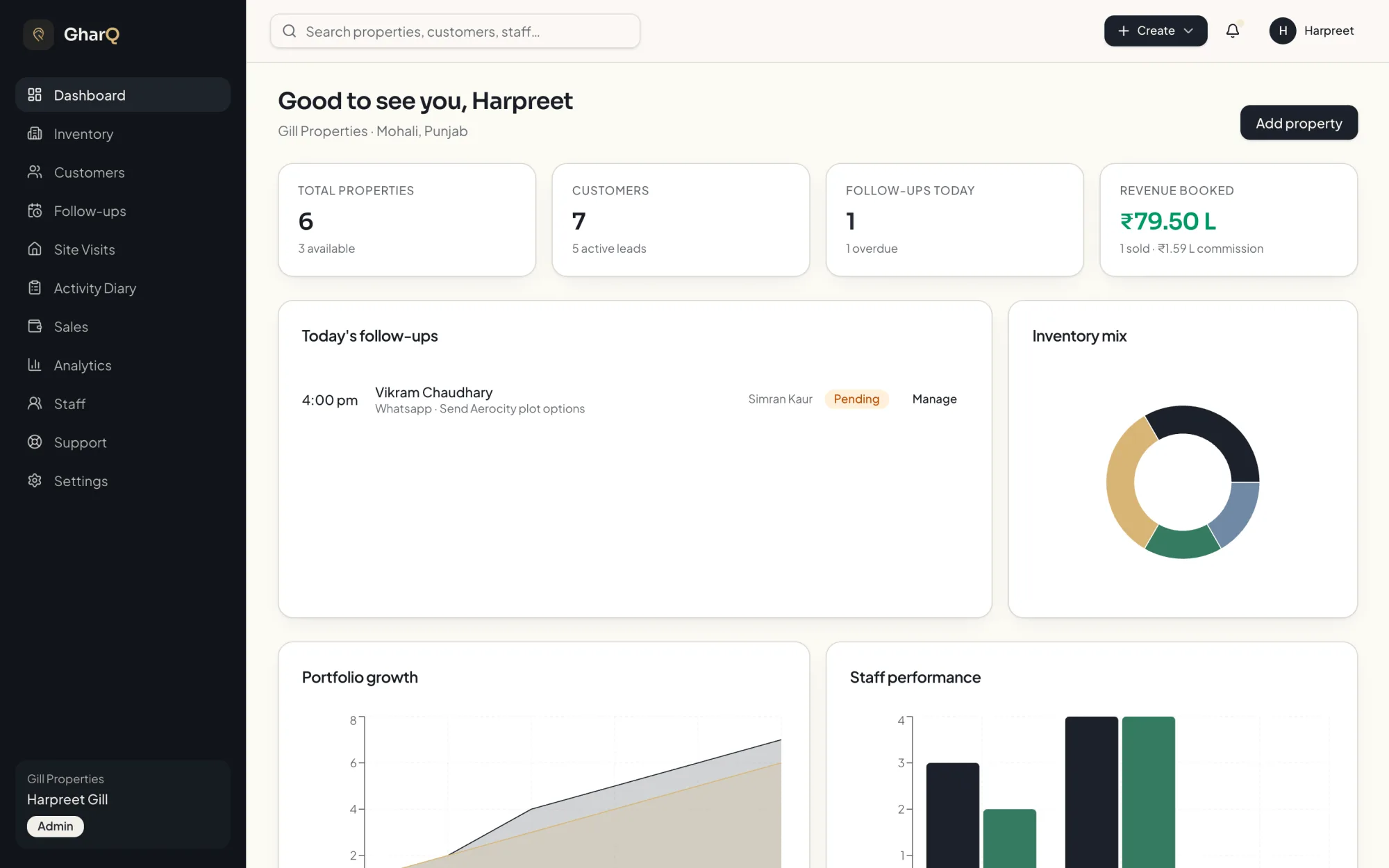
Owner Dashboard
Inventory count, active leads, follow-ups due today and revenue booked — the state of the business the moment you sign in.
- 02
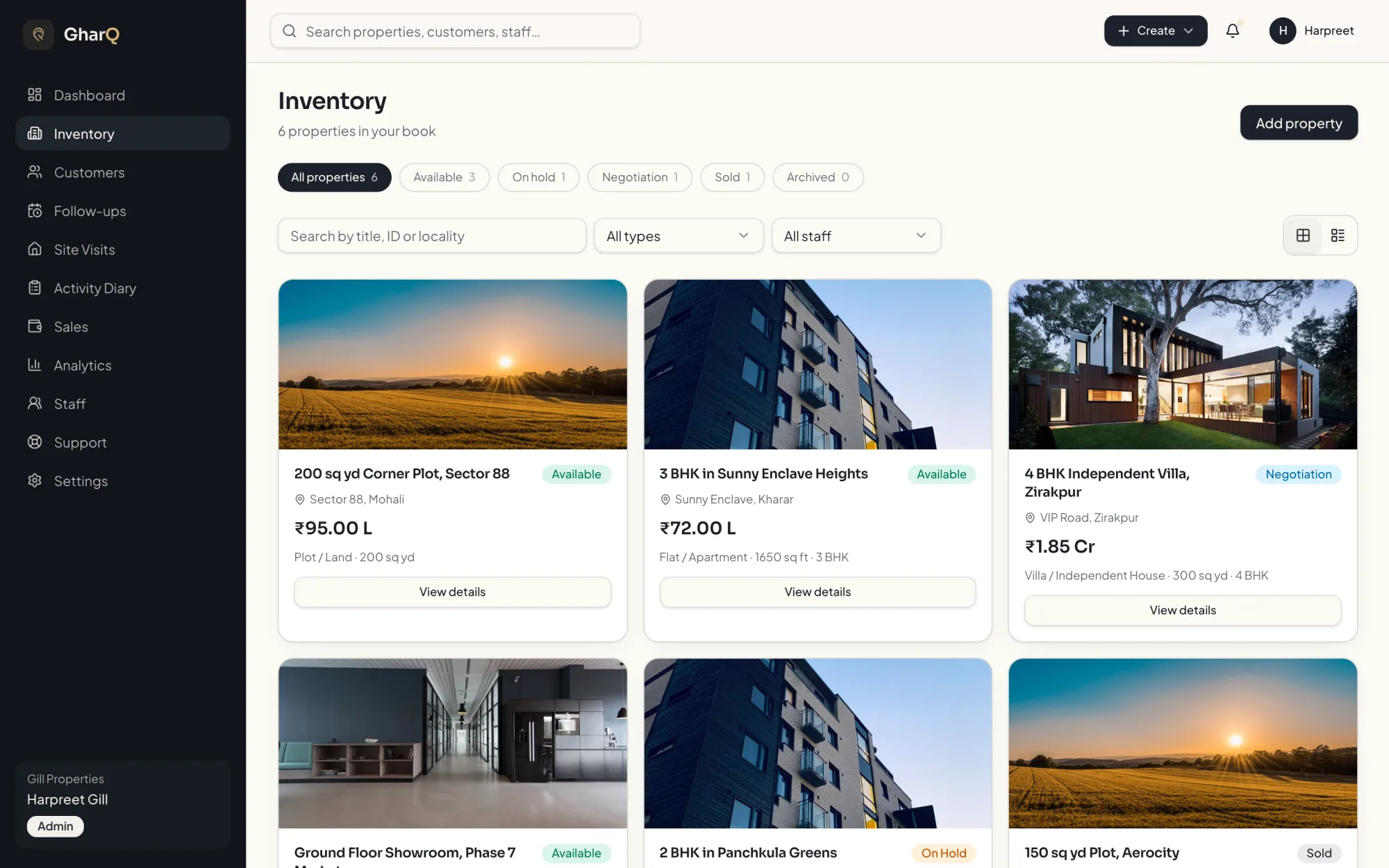
Property Inventory
List plots, flats, villas and commercial units with pricing, configuration, locality and a photo gallery for each.
- 03
Property Detail
An e-commerce-style listing page: full-bleed gallery with lightbox, specification breakdown and every linked buyer at a glance.
- 04
Buyer ↔ Property Matching
Open any property and see ranked buyers with a compatibility score and the exact reasons behind it.
- 05
Customer & Lead Pipeline
Capture requirement, budget range and interest level, then move each buyer through new, contacted, site visit, negotiation and converted.
- 06
Clickable Analytics
Revenue, conversion, deal size and inventory mix — every chart segment drills through to the records behind it.
Every screen
The full experience.
What makes it different
Built For Many Agencies At Once
Every agency gets its own private workspace — its inventory, customers and team are visible only to its own people.
Private Agency Workspaces
Each agency's listings, buyers and staff are completely separated, so one agency can never see another's records.
Role-Based Access
Super admin, agency admin and staff each get a different surface — staff work their own pipeline, owners see the whole business.
Transparent Match Scoring
Buyer requirements are scored against live inventory on budget, type, locality and configuration — transparent reasons, not a black box.
Everything Leaves A Trail
Property edits, status changes, follow-ups and visits are recorded automatically, powering the activity diary and staff history.
More inside
The Whole Pipeline, End To End.
From the day a property is listed to the day it is sold — every screen an agency actually uses during the week.
Follow-Up Hub
A dedicated daily calling list split into today, upcoming and overdue, with reschedule and complete in one tap.
Site Visits
Schedule visits against a property and a buyer, then record structured feedback once the visit is done.
Activity Diary
A chronological, icon-coded feed of everything the team did, filterable down to an individual staff member's history.
Live Notifications
Overdue follow-ups, visits due today and support replies surface automatically, the moment they matter.
Staff & Roles
Invite staff, set their role and hand over credentials in-app — no invitation emails to chase or bounce.
In-App Support Desk
Agencies raise tickets from inside the product and hold a threaded conversation with the platform team.
What comes next
On the roadmap.
The product keeps evolving around real user feedback — adding capability without sacrificing clarity or privacy.
- 01WhatsApp follow-up integration
- 02Bulk inventory import from spreadsheets
- 03Owner and builder portal
- 04Document vault for agreements and receipts
- 05Mobile companion app for field staff
- 06Configurable commission and payout tracking
Available now
See GharQ Live.
The full platform is deployed and running in production. Open it in your browser and walk through the inventory, matching and analytics for yourself.
Next project
SmileDesk
One platform for the whole dental practice.